🇧🇷 Communication

Communicate with Portuguese (Brazil)-Speaking Customers

The best way to communicate with Portuguese (Brazil)-speaking customers. AI-powered phone translation removes language barriers instantly.

How does TalkTool translate phone calls to Portuguese (Brazil)?

Translate business calls between English and Portuguese (Brazil). TalkTool translates business phone conversations in both directions with AI. Place outgoing calls, configure incoming call routing on a paid plan, or add an interpreter to a supported conference call. Callers use their usual phone without installing TalkTool.

Source:

At a glance

  • 60+ languages
  • Pay As You Go: outgoing calls at $0.30/minute after the free starting allowance
  • Incoming call routing, voicemail and IVR on paid plans
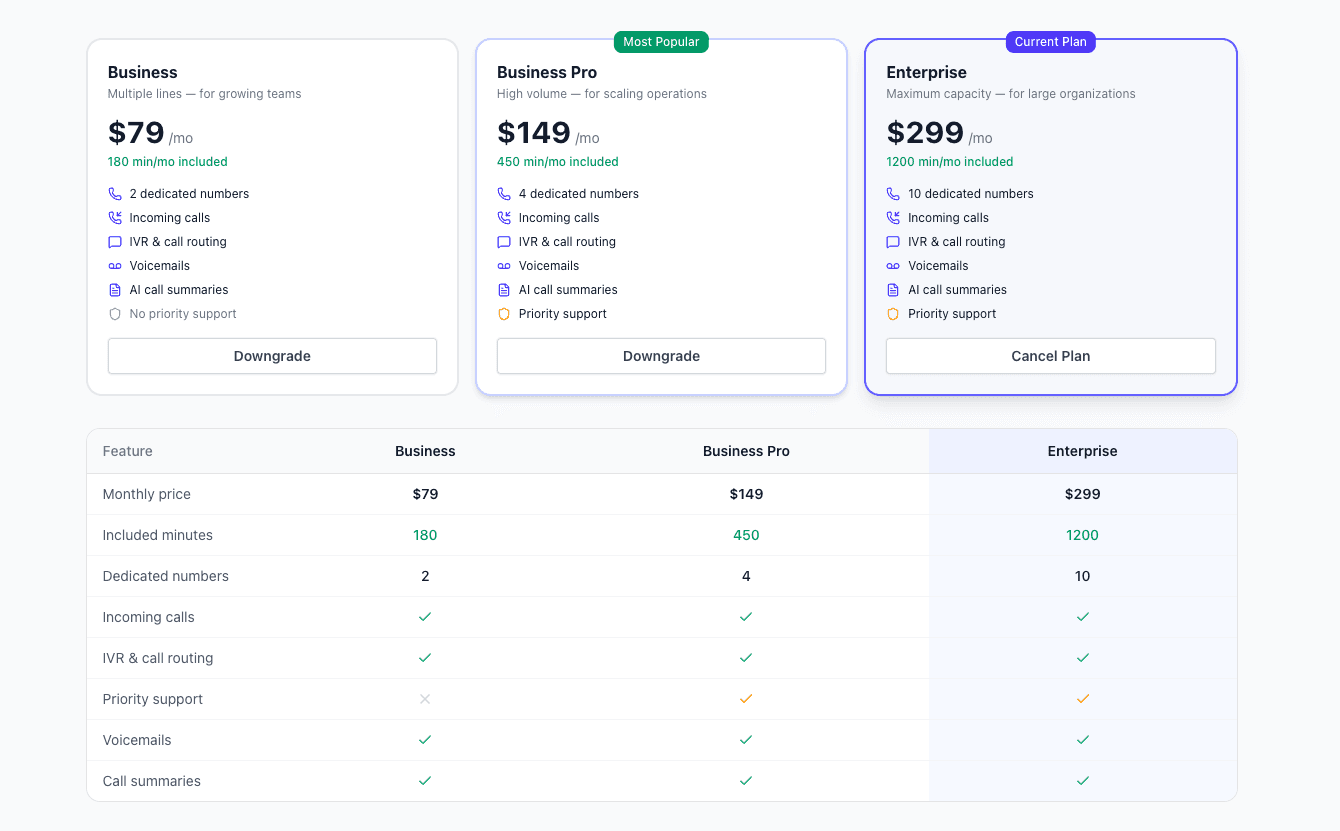
  • Starter: $149/month, 300 included minutes and two dedicated numbers
  • Additional usage: $0.30 per minute
  • Callers do not need to install an app

Why Portuguese (Brazil) Customer Communication Matters

You're losing Portuguese (Brazil)-speaking customers because of the language barrier. They want to buy, they want support, they want to connect—but they can't communicate effectively with your team. Translation apps don't work for phone calls, and hiring bilingual staff is expensive.

Real-time phone translation changes the equation. Your team can communicate naturally with Portuguese (Brazil)-speaking customers without learning the language. Conversations flow naturally, relationships develop authentically, and your business grows.

This isn't just about transactions—it's about building real relationships with Portuguese (Brazil)-speaking customers. When customers can communicate in their native language, they feel valued and understood. That's the foundation of customer loyalty.

How to Set Up Portuguese (Brazil) Call Routing

  1. 1

    Enable Call Routing

    Incoming call translation, dedicated numbers, translated voicemail and multilingual IVR require a paid plan. Starter includes 300 minutes and two dedicated numbers for $149/month.

    • Add from your dashboard
    • Cancel anytime
    • Test each configured routing destination
    Enable routing
  2. 2

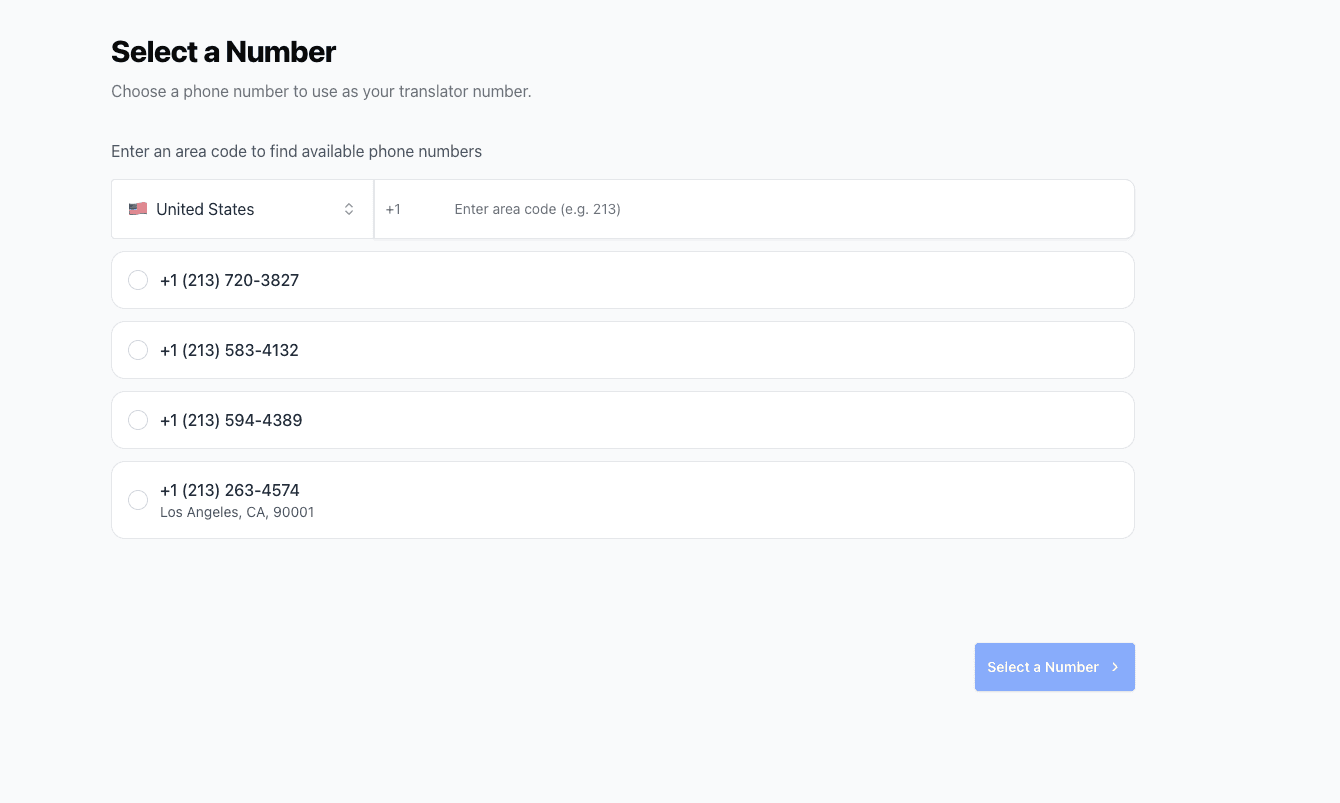
    Get a Translator Number

    Purchase or select a translator number. This is the number that will receive and translate incoming calls before forwarding to your team.

    • Dedicated translation number
    • Choose your area code
    • Use existing number if available
    Translator number
  3. 3

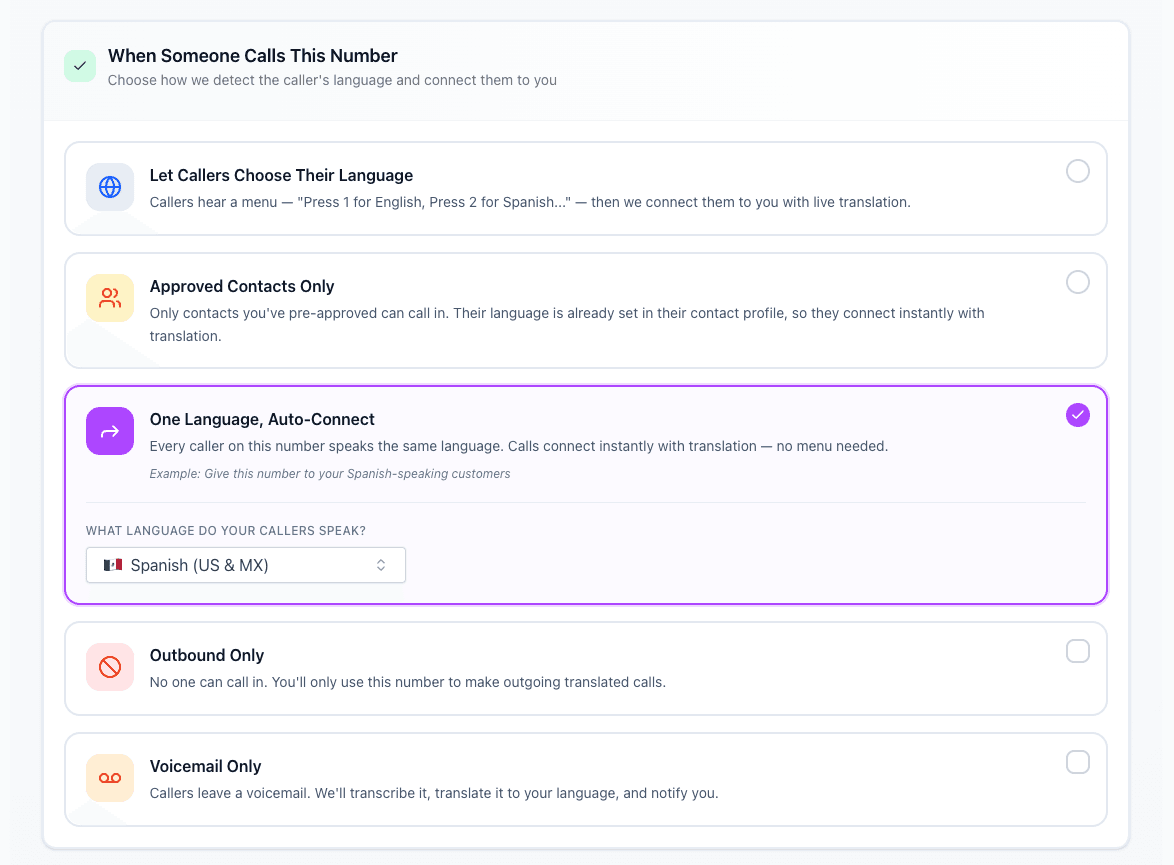
    Set Up Routing

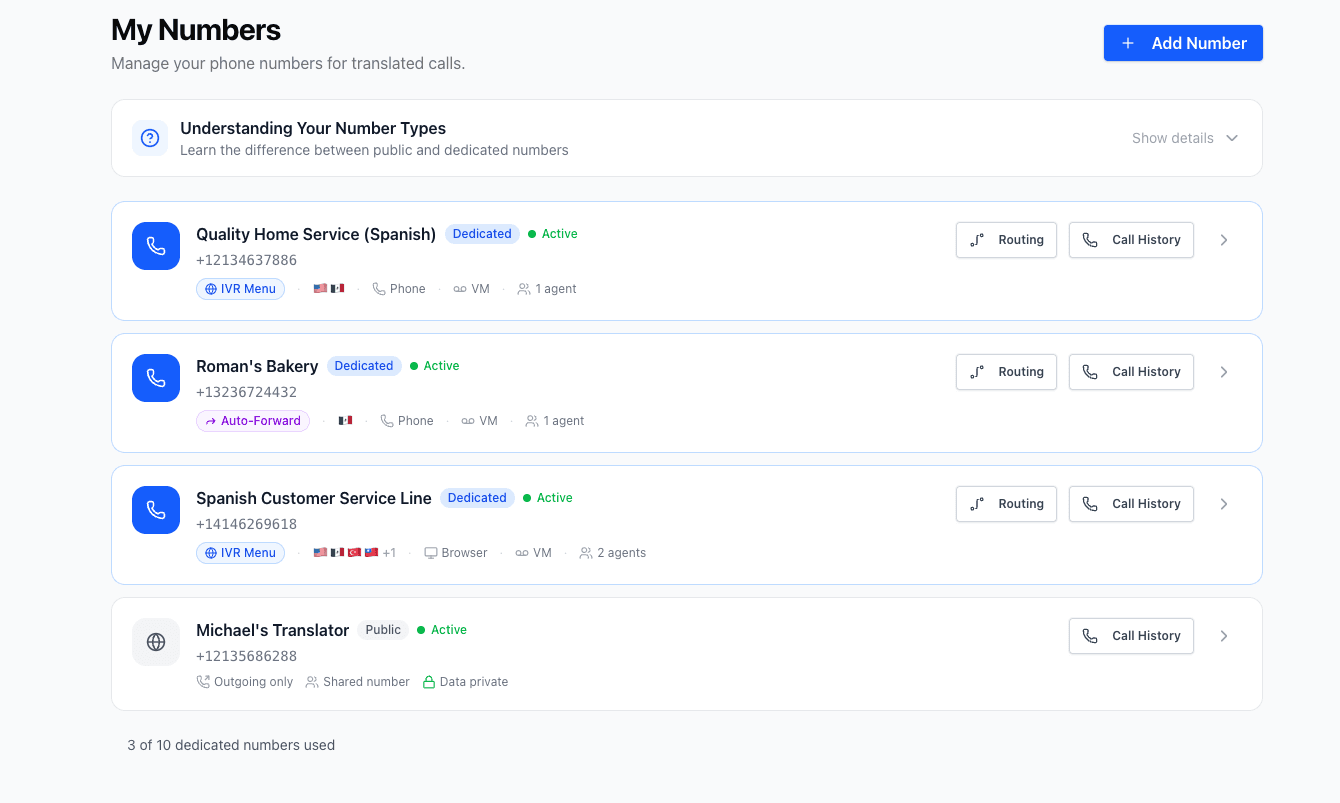
    Navigate to the Numbers section in your dashboard and select Routing. Choose how Portuguese (Brazil) calls should be handled: IVR (caller selects language), allowlist (known callers preset), preset language (all calls in Portuguese (Brazil)), or block (reject calls).

    • IVR: Caller chooses their language
    • Allowlist: Preset for known numbers
    • Preset: Assume one language for all
    • Block: Reject unwanted calls
    Routing options
  4. 4

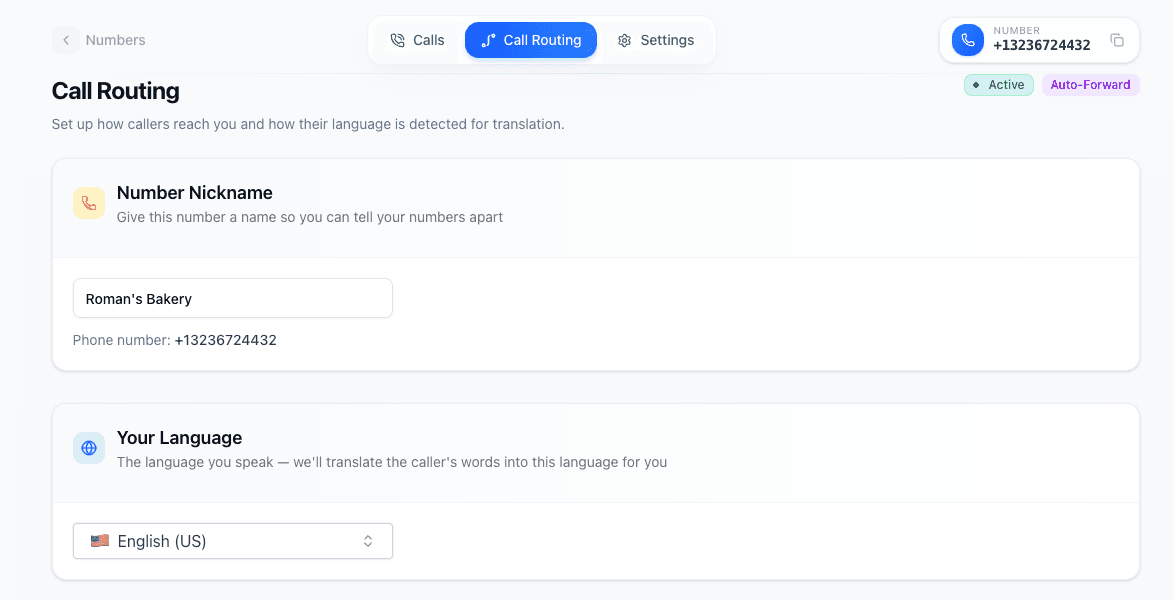
    Select Your Primary Language

    Choose your team's primary language (English). This is the language your team speaks, not the customer's language. The AI will translate incoming Portuguese (Brazil) to English for your team.

    • Your team's spoken language
    • Usually English for US teams
    • Can be changed per number
    Primary language
  5. 5

    Set Your Forwarding Number

    Enter your main business number as the forward destination. After translation, calls will be sent to this number for your team to answer.

    • Your existing business line
    • Mobile or landline works
    • Forward to any phone number
    Forwarding number setup
  6. 6

    Configure Forwarding Options

    Choose how translated calls reach your team. Ring in the browser, forward to a phone number, or both. Set custom ring duration and fallback behavior.

    • Ring in browser or on your phone
    • Set custom ring duration
    • Configure fallback if no answer
    Forwarding options
  7. 7

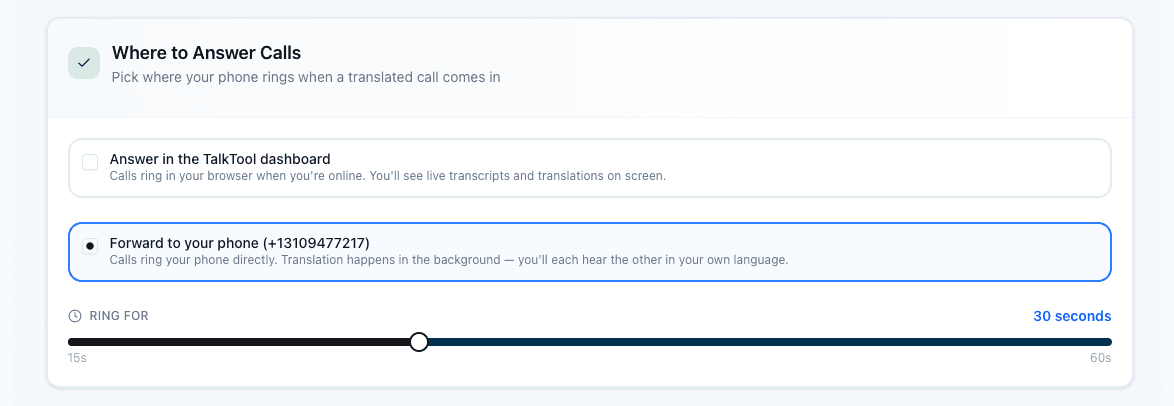
    Select Where Translated Calls Ring

    Choose how translated calls reach your team. Ring in the browser or forward to a phone number. Set custom ring duration and fallback behavior.

    • Ring in browser or on your phone
    • Set custom ring duration
    • Configure fallback if no answer
    Ringing options
  8. 8

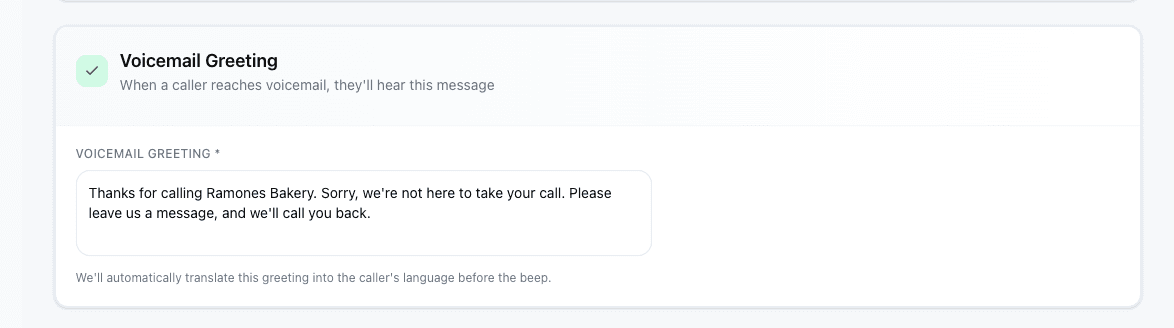
    Set Up Your Voicemail Greeting

    Customize the voicemail message callers hear when no one answers. TalkTool automatically translates your greeting into the caller's language.

    • Auto-translated into caller's language
    • Callers can leave a message after the beep
    • Voicemails are transcribed and translated for you
    Voicemail greeting setup
  9. 9

    Save and Start Accepting Calls

    Save your configuration and your number is ready. Portuguese (Brazil)-speaking customers can now call and be automatically translated to your team.

    • Changes apply immediately
    • Test with a sample call
    • Monitor calls in dashboard

Portuguese (Brazil) Translation Features

Everything you need for seamless multilingual communication

Your Team, Any Language

Your existing team handles all calls with AI translation.

Review Customer Feedback

Ask customers whether the conversation resolved their question, and compare feedback during your pilot.

Translation by Spoken Turn

Translation follows each spoken turn. Response time varies with speech length, language and network conditions.

Consistent Service

Review the result for each language pair instead of assuming identical accuracy.

Call Analytics

Track all calls with full transcripts in both languages.

Scale Effortlessly

Handle growing multilingual demand without hiring.

Who Uses Portuguese (Brazil) Translation?

Businesses and individuals across industries rely on real-time Portuguese (Brazil) translation for critical communications.

Customer Service

Handle support calls from customers who speak different languages without hiring multilingual staff.

Healthcare

Communicate with patients about appointments, symptoms, and follow-up care in their native language.

Legal Services

Conduct client consultations and gather information accurately across language barriers.

Business & Sales

Close deals and maintain relationships with international clients and partners.

Family & Personal

Stay connected with family members who speak different languages or dialects.

Education

Communicate with parents and students from diverse linguistic backgrounds.

Frequently asked questions

How accurate is the Portuguese (Brazil) translation?
Translation quality varies with audio, accents and terminology. Test Portuguese (Brazil) calls with your team, confirm names and numbers, and use a qualified human interpreter when the situation requires one.
Is there a delay when translating to Portuguese (Brazil)?
Translation follows each spoken turn. Response time varies with speech length, language and network conditions.
Can I translate calls with Portuguese (Brazil) speakers who have accents?
Accents and recording quality can affect Portuguese (Brazil) translation. Test the regional variant you expect, speak in short turns, and confirm unclear details.
What if the Portuguese (Brazil) speaker uses slang or informal language?
The AI handles informal Portuguese (Brazil) well and translates it appropriately. You'll get the meaning, not a word-for-word translation.
How much does it cost?
Incoming call translation, dedicated numbers, translated voicemail and multilingual IVR require a paid plan. Starter includes 300 minutes and two dedicated numbers for $149/month. Usage is measured from call duration, including both participants’ speaking time. Included plan minutes are used before prepaid minutes; additional usage is $0.30 per minute. A total of 20 billable minutes costs $6 before any included allowance.
Do I need to install any software?
No software needed. You get a phone number that handles translation automatically. Call from any phone - mobile, desk phone, or VoIP.

Ready to communicate in Portuguese (Brazil)?

Get started in minutes and break down language barriers today.

Start free · No long-term contract · Cancel anytime