How-To Guide
How to Set Up a Multilingual IVR System
Create an automated phone menu that lets callers choose their preferred language. Support 60+ languages with AI translation. Setup takes just 15 minutes.
How do you set up a multilingual IVR system?
To set up a multilingual IVR with talktool: 1) Get a dedicated phone number (included with every paid plan), 2) Go to Call Routing settings in your dashboard, 3) Select 'IVR Language Selection' mode, 4) Add your language options (up to 9), 5) Customize your greeting message, and 6) Test by calling your number. Setup takes about 15 minutes and supports 60+ languages with AI translation at $0.30/minute.
Source: talktoolAt a glance
- Setup time: 10-15 minutes
- 60+ languages supported
- Up to 9 language options per menu
- Cost: Dedicated number included with your plan
- Translation: $0.30/minute
- No coding required
Don’t have callers yet? Prototype the audio first.
Try the Free IVR Generator — build a multilingual phone-menu MP3 in under two minutes, no credit card. Use it to preview exactly what your callers will hear before wiring up the live IVR in your dashboard.
Step-by-Step IVR Setup
- 1
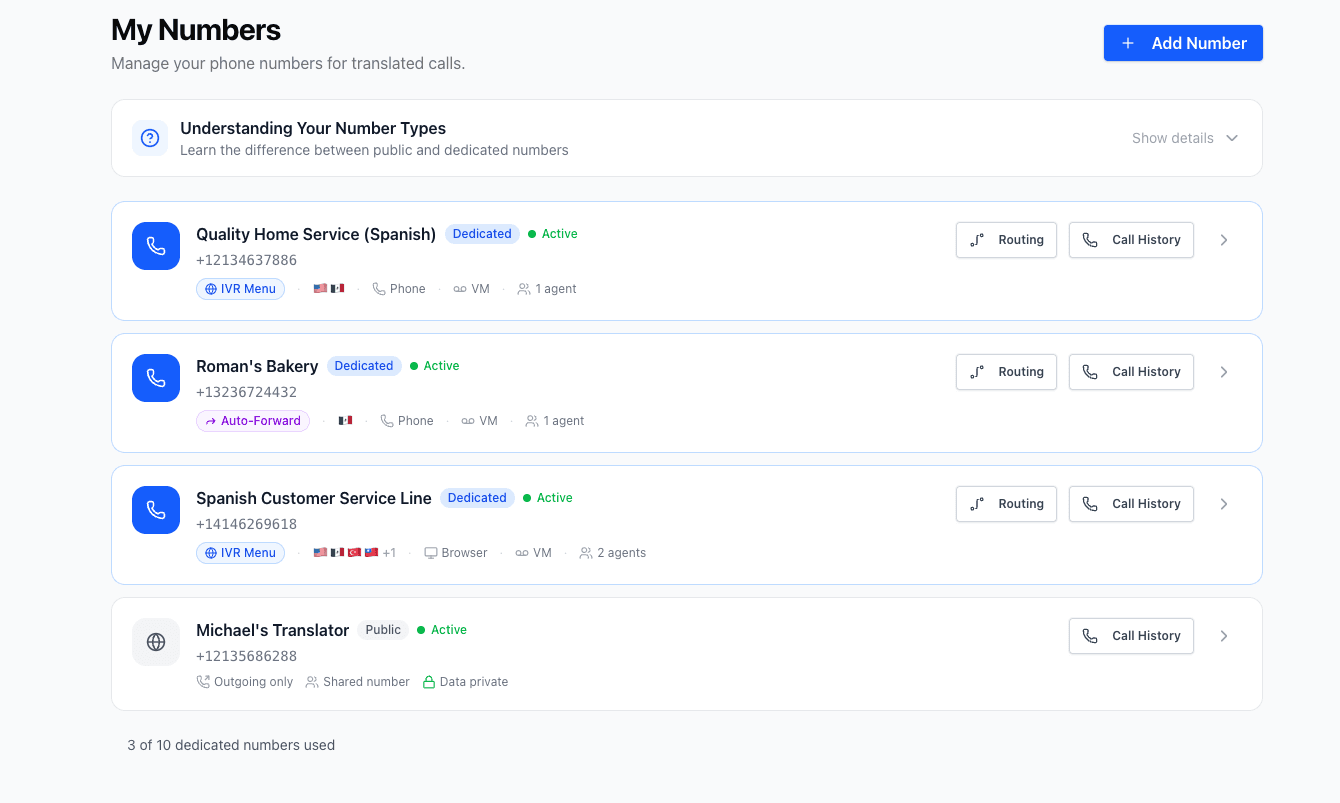
Access Your Call Routing Settings
Log into your talktool dashboard and navigate to the 'Call Routing' section under your number settings. This is where you'll configure how incoming calls are handled.
- Each translator number has its own routing settings
- You can configure different IVR menus for different numbers
- Changes take effect immediately after saving
- 2
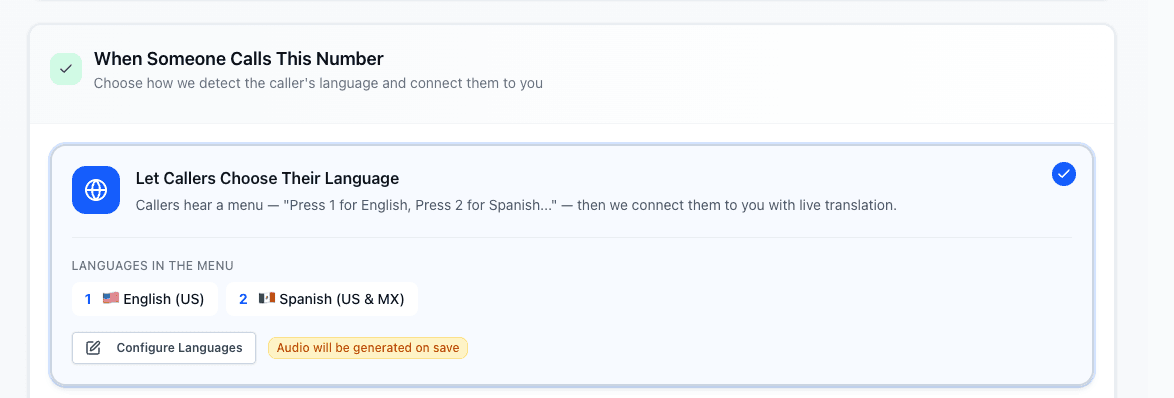
Select 'IVR Language Selection' Mode
Choose the 'IVR Language Selection' option as your inbound call plan. This enables the automated menu that lets callers choose their language before connecting.
- This mode is ideal for businesses serving multiple language communities
- Callers hear the menu immediately when they call
- You can switch modes anytime without losing settings
- 3
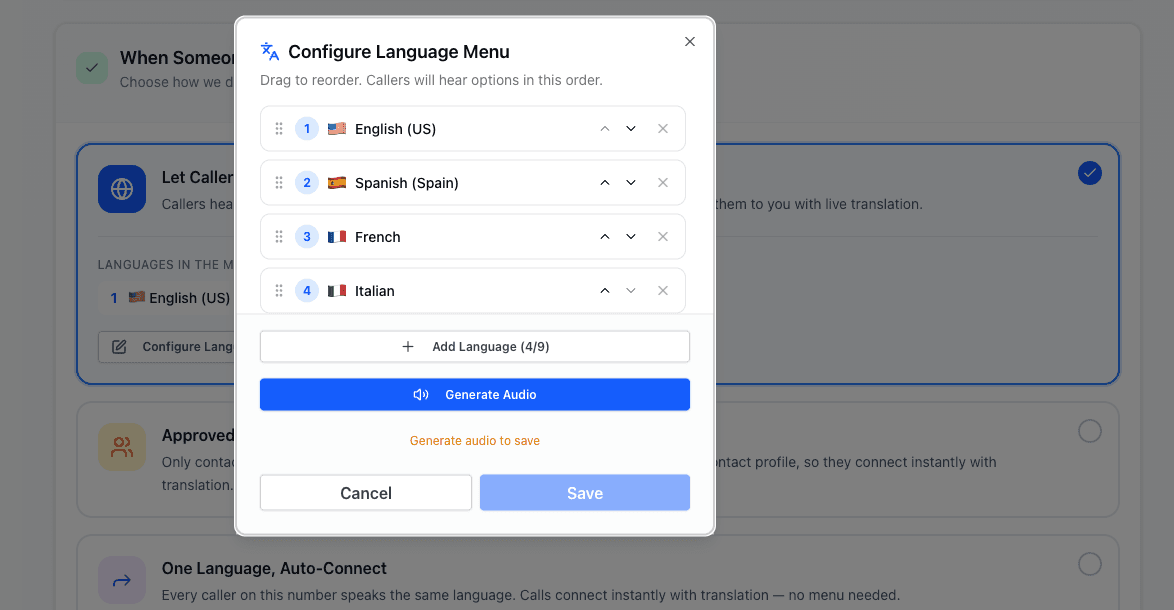
Configure Your Language Options
Add the languages you want to support in your IVR menu. Assign a key press (1-9) to each language. The most common languages should be first options.
- Start with your most frequently requested languages
- You can add up to 9 language options
- Consider adding "Press 0 for operator" as a fallback
- 4
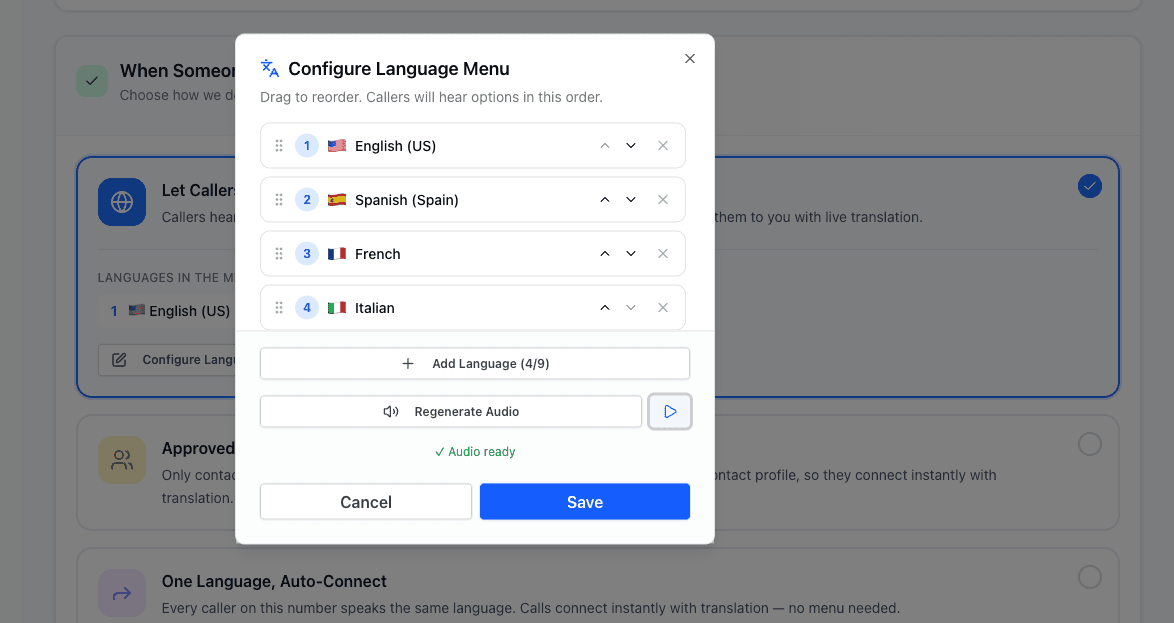
Customize Your Greeting Message
Write or record your IVR greeting. The system can auto-generate greetings in each language, or you can provide custom text that will be spoken with natural AI voices.
- Keep greetings concise (under 15 seconds total)
- State options clearly: 'For English, press 1. Para español, oprima 2.'
- Test how greetings sound before going live
- 5
Set Your Default & Timeout Options
Configure what happens if a caller doesn't make a selection. Choose a default language or forward to your main line. Set timeout duration (typically 10-15 seconds).
- Default language ensures no caller is left waiting
- Consider forwarding unanswered calls to a live operator
- Test the full caller experience before going live
- 6
Test Your IVR Setup
Call your translator number from another phone to test the complete caller experience. Verify each language option routes correctly and translations work as expected.
- Test from a mobile phone to hear actual caller experience
- Try each language option to confirm routing
- Ask a colleague who speaks another language to test
IVR Features
Everything you need for a professional multilingual phone system
Visual IVR Builder
Easy interface to build your phone menu without any coding required.
60+ Languages
Support for all major world languages in your IVR menu options.
Natural AI Voices
High-quality text-to-speech for professional-sounding greetings in any language.
Flexible Routing
Route different languages to different team members or departments.
Call Analytics
See which languages are most requested and optimize your menu accordingly.
Caller Recognition
Returning callers can skip the IVR based on their saved language preference.
Frequently asked questions
How many languages can I add to my IVR?
How much does a multilingual IVR cost?
Can I use my own recorded greetings?
What happens if a caller presses the wrong key?
Can I have different IVR menus for different numbers?
Does the IVR work with caller ID language routing?
How long does it take to set up a multilingual IVR?
Can the IVR greeting play in multiple languages?
Ready to set up your multilingual IVR?
Get your translator number and create your language menu in 15 minutes. Your number is included with your plan; translation is $0.30/minute.
Start free · No long-term contract · Cancel anytime